Link to our FAQ page for more articles: support.workland.com
You have the ability to delete an incomplete application and restart it in Atlas as long as the job is still active (in process) and has not expired. If the application has not yet been submitted, you can delete it by following these steps:
1. Log in to your Atlas Connect account on atlas.workland.com.
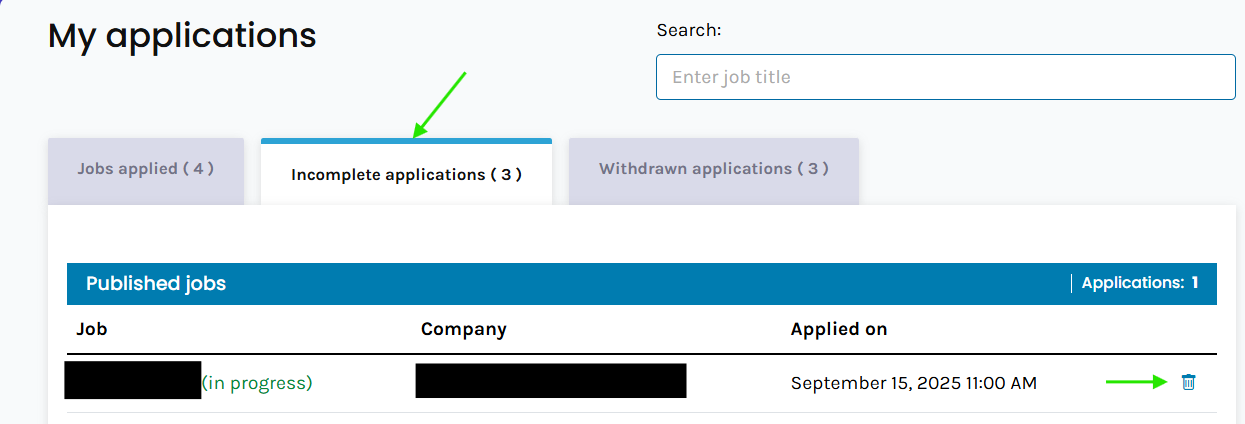
2. Go to "Jobs Applied" (your applications).
3. Under "Incomplete Applications", locate the application you wish to delete.
4. Click the trash can icon next to it.
5. A confirmation box will appear. You will need to acknowledge and click on the following options shown in the image before you press Delete.
6. Once you press delete, your incomplete application will be permanently deleted and you have the option to re-apply to the job posting if you wish.
Important:
If you do not see the trash can icon, this means the employer has not activated the delete option. In this case, the application will need to be completed and submitted. Once submitted, please contact the employer directly to inform them that you would like to provide the correct document.
Was this article helpful?
That’s Great!
Thank you for your feedback
Sorry! We couldn't be helpful
Thank you for your feedback
Feedback sent
We appreciate your effort and will try to fix the article