Link to our FAQ page for more articles: support.workland.com
In the event that your application is not submitted...
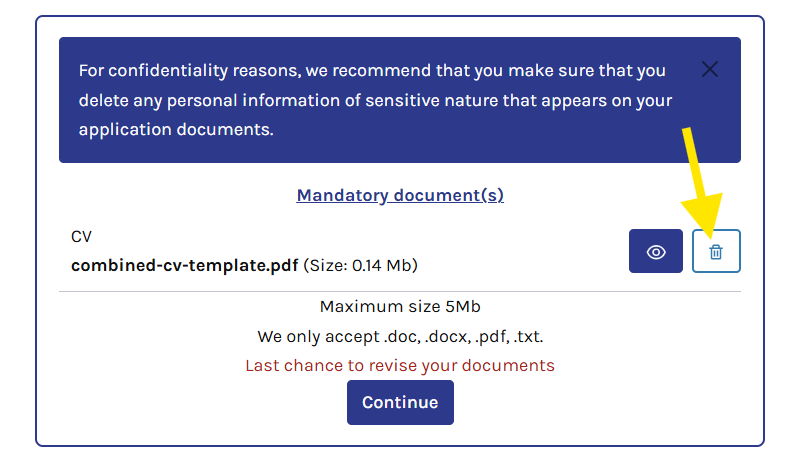
You can edit or delete a downloaded document before selecting "Continue".
You can click on the small trash can icon to delete the document.
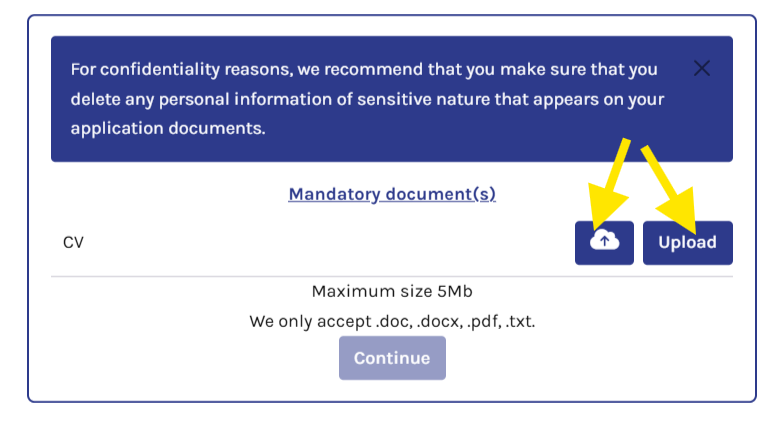
Afterwards, you can click on "Upload" to be able to insert the document again. The cloud upload option is available if you are logged into your candidate portal and have already uploaded documents in the past.
When is it no longer possible to revise your documents?
If you have completed the document section and have reached the pre-screening questions section, it is no longer possible to modify the documents you uploaded.
In this case, you will need to continue and submit your application. Once your application has been submitted, any request for changes or the submission of a corrected document must be made directly to the employer, as the application then belongs to them.
To help facilitate your communication with the employer, we recommend providing the following information:
Job title
Email address used for the application
Document submitted in error
Reason for requesting the modification
Was this article helpful?
That’s Great!
Thank you for your feedback
Sorry! We couldn't be helpful
Thank you for your feedback
Feedback sent
We appreciate your effort and will try to fix the article